
Parking with your license plate is part of the gateless parking experience (LPR), allowing you to scan in to the garage without scanning your phone.
How it works:
When you get to the iParkit location, a camera will scan your license plate and connect your parking stay to your iParkit account.
You must drive in with your account's favorite vehicle to park gateless.
LPR is offered at most iParkit locations.
How to add your vehicle:
On App:
-
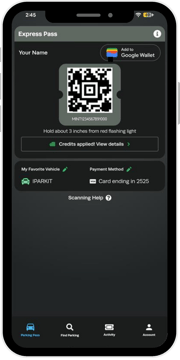
After opening the iParkit app, tap "My Favorite Vehicle" (located under your Express QR Code)
-
Select "Add Vehicle" and add your vehicle details (please ensure your License Plate Number and State are accurate)
- Select "Make this my favorite vehicle"
On Web:
-
Go to the top right of the website (iparkit.com) to "Account" and log into your account
-
Go to Vehicles (iparkit.com/settings/vehicles)
- Select "Add Vehicle" and you will see a pop-up saying "Park with Your Plate"
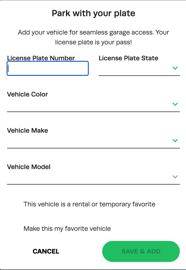
- After you add your vehicle information, make sure to select "Make this my favorite vehicle" and then hit "Save".
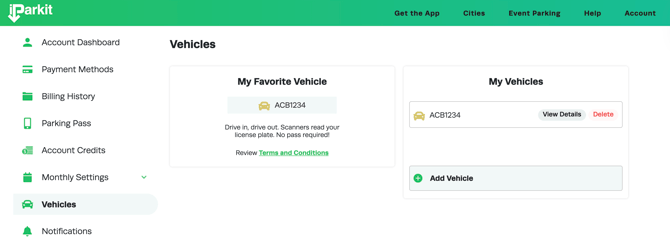
If you use a different car, you will need to follow these steps again.
Can I have more than one vehicle?
You may store multiple vehicles on your account; however, you’ll need to select your active (favorite) vehicle before each visit when using a different car. Our system recognizes the license plate of your favorite vehicle for gateless entry and billing.
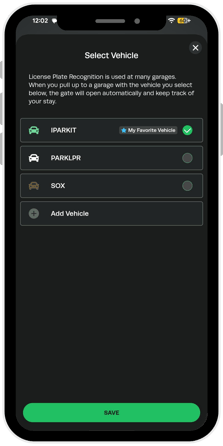
What happens if I park without using my favorite vehicle?
If you arrive in a vehicle that is not set as your active vehicle, you will need to scan your pass as usual. At gateless locations, failure to do so may result in being charged the standard drive-up rate instead of your discounted member rate.
Can I remove a vehicle?
If you would like to remove your vehicle information, simply click on the license plate you want to remove and select "Remove Vehicle".
I tried to add my vehicle, but it says it's in use?
If you tried to add your plate information, but you get an alert saying "that plate is already in use," then your license plate has already been attached to a different account. Please contact iparkitsupport@intpark.com for help.