How to sign up on the iparkit website, app, and if your company has a corporate program.
(If your company, school, or location would like to sign up for specialized monthly rates, please go to: https://www.iparkit.com/corporate-express , and an iParkit Representative will be happy to help you fit a rate to your needs)
The steps for web
- Go to the main landing page and select “Monthly”
- Choose your city
- Go to your desired iParkit location
- Decide between what subscription offering works best for you
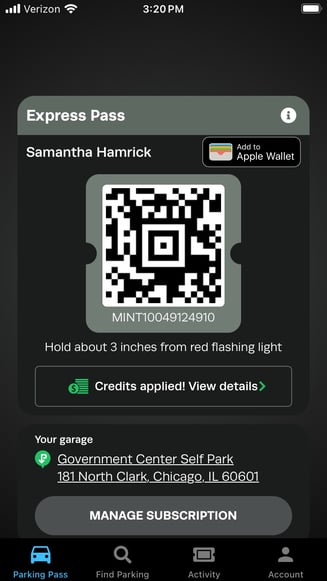
- Your monthly pass will be apart of your same Express pass. No need switch between QR codes! Your monthly garage will appear on the pass.
If you have a special rate through your company or school, please go to: https://www.iparkit.com/monthly-specials
-
Enter your email address (use your work or school email in order to unlock your special rate)
- After receiving the code to your email (check your spam if it doesn't arrive in a few minutes) enter the code
- The special rates for specific locations will appear. These are the only locations available for your work/school that have been discussed with our team.
- If the rates don't appear, ask your company for the subscription parking promo code
If you have any problems or the location you are looking for isn't included in the list, please reach out to iparkitmonthlyspecials@intpark.com or iparkitsupport@intpark.com
The steps for app
- Choose your city
- Go to your desired iParkit location
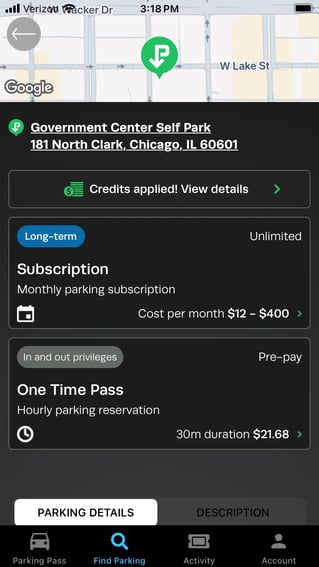
- Decide between what subscription offering works best for you
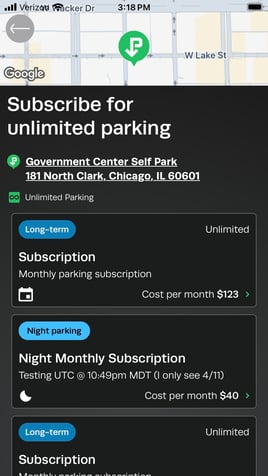
- Your monthly pass will be apart of your same Express pass. No need switch between QR codes! Your monthly garage will appear on the pass.